Group Arrival
Report Parameters
|
Field |
Description |
|---|---|
|
Report Name |
The name of the report. |
|
Start Date |
The start date from when the data must be considered for generating the report. |
|
End Date |
The end date until when the data must be considered for generating the report. |
|
Groups |
Select preferred groups from the drop-down list. Users can select multiple or all the available groups from the list to be displayed in the report generated. |
|
Print Label Format |
When enabled, the report will be generated in label format. |
|
Include Shoulder Dates |
By default, the flag will be enabled. |
Sample Report
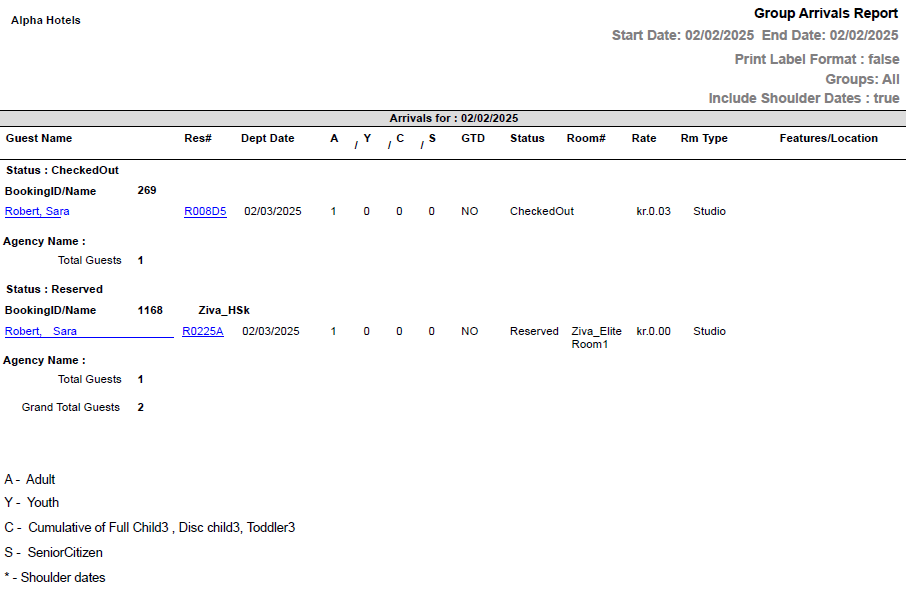
Report Fields
|
Field |
Description |
|---|---|
|
Arrivals For |
The date for which the guest arrival details are displayed. |
|
Guest Name |
The last name and first name of the guest added to the reservation. |
|
Res# |
The confirmation number of the reservation. |
|
Dept Date |
The departure date of the guest. |
|
A |
The number of adults on the reservation. |
|
Y |
The number of youths on the reservation. |
|
C |
The number of children on the reservation. |
|
GTD |
Indicates whether the guest reservation is guaranteed. |
|
Status |
The status of the reservation. |
|
Room# |
The room number of the guest. |
|
Rate |
The rate of the room type selected for the reservation. |
|
Rm Type |
The room type selected for the reservation. |
|
Features/Location |
The features/locations added to the reservation. |
|
BookingID/Name |
The booking ID and name of the group booking. |
|
Agency Name |
The name of the travel agency associated with the reservation. |
|
Note: Report considers Sold Rates against the rooms |
|